Credit: Dibakar Ghosh | How-To Geek
Most people who use AI assistants spend more time switching windows than they think. You copy something, alt+tab to a browser, open a chat window, paste it in, wait, copy the response, and tab back to wherever you were. If you do that twenty times a day, you’re losing more time to that routine than to the actual problem you’re trying to solve. Wiring your Windows clipboard directly to Claude’s API will help you out.
Moving between windows to use AI is a waste of time
Set up a background script to watch your clipboard
-
 Credit: Jorge Aguilar / HowToGeek
 -
 Credit: Jorge Aguilar / HowToGeek
 -
 Credit: Jorge Aguilar / HowToGeek
 -
 Credit: Jorge Aguilar / HowToGeek
 -
 Credit: Jorge Aguilar / HowToGeek



-
 Credit: Jorge Aguilar / HowToGeek
 -
 Credit: Jorge Aguilar / HowToGeek
 -
 Credit: Jorge Aguilar / HowToGeek
 -
 Credit: Jorge Aguilar / HowToGeek
 -
 Credit: Jorge Aguilar / HowToGeek




To get your Windows clipboard talking to Claude’s API, you’ll need to set up a Python environment with a couple of key libraries. Install pyperclip and the Anthropic SDK through pip. Pyperclip is simple to work with because it gives you basic copy() and paste() functions and even has a waitForNewPaste() function that sits and waits until something new lands on your clipboard.
This sets up a background window that only wakes up when the clipboard actually updates, dropping idle CPU usage to practically nothing, so your memory use stays low. Whichever route you go, the goal is a script that runs quietly in the background and doesn’t get in the way of your work.
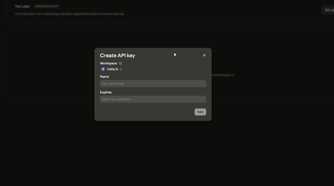
Once you’ve got clipboard monitoring sorted, the next step is connecting it to Claude’s API without doing anything careless with your credentials. Don’t hardcode your API key into the script; instead, store it in an environment variable and load it at runtime. From there, whenever the script picks up new clipboard text, it packages that text into a prompt and sends it off to Claude.
For this kind of background automation, Claude 3.5 Sonnet is a good choice in my opinion. It’s fast and likely won’t cost a fortune to run continuously. Either way, make sure to set your max_tokens value so you don’t go over what you’re willing to spend. This gives you control over response length and protects you from runaway costs.
Get your work done without ever switching to a browser
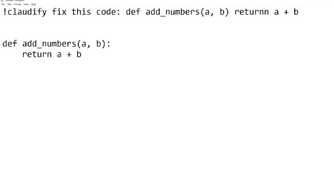
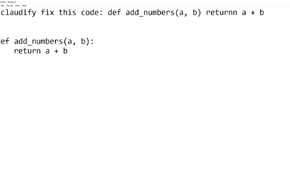
Use prefixes to fix your code or translate text instantly
 Credit: Jorge Aguilar / HowToGeek
Connecting your Windows clipboard to Claude’s API cuts down on the constant back-and-forth of switching windows just to use an AI. Normally, you’d stop what you’re doing, open a browser, paste your text into a chat window, wait for a response, copy it, and switch back to whatever you were doing.
This runs in the background and watches your clipboard, and when you copy something with a specific prefix attached, it picks that up, sends it off to Claude with the right instructions, and drops the response straight back into your clipboard. By the time you hit paste, the AI has already done its job.
It also hooks into native UI automation so rich-text apps don’t lose their formatting in the process. One of the most useful things you can do with this is debug code without ever leaving your editor. If you’ve got a broken function, you highlight it, add a quick prefix, and copy. The script wraps your code in delimiters, so Claude knows exactly what your instructions are and what’s raw code, then sends it off to the model.
Claude is always excellent at explaining what went wrong and thinking through edge cases, so there’s not much to worry about there. The fixed code comes back to your clipboard, and you paste it straight over the original.
It works just as well outside of coding, too. If you’re trying to translate a long email into another language, you highlight the text, add a translation prefix, copy it, and paste the result wherever you need it. It has a few fantastic ways of working, but keep in mind that all of them take up tokens.
Keep your private data safe and your API costs low
Be very careful with what you send to Claude
 Credit: Dibakar Ghosh | How-To Geek
Running a background script that monitors your Windows clipboard comes with real privacy and cost risks you should think about. The clipboard is a system-level resource, which means everything you copy goes into it. So every time you copy casual notes, passwords, account numbers, or API keys, you are running them through the system.
So you’re really risking exposing private data to Claude’s servers and racking up token costs faster than you’d expect. The smart way to fix this is to set a trigger prefix. This way, the script only wakes up when copied text starts with a specific symbol or keyword you’ve chosen.
Also, you should use a password manager that flags copied credentials to bypass clipboard monitors, and make a habit of clearing your clipboard history, so nothing sensitive stays in memory or ends up in a hibernation file.
Even with a solid trigger system in place, API latency is one of those things you’ll bump into eventually. If things feel slow, you can build a simple routing layer that looks at what’s being asked before deciding which model to call.
Quick jobs like fixing a typo or reformatting a sentence can go to a faster, cheaper model like Claude Haiku 4.5, while anything more demanding gets routed to a heavier model. If your script holds onto conversation history, that context window grows over time and quietly slows everything down.
Make sure to summarize older turns or take out redundant content so you can cut the token count. Also, make sure the API is set to stream responses back instead of waiting until the full output is ready.
It’s up to you to do everything right
A background script that watches your clipboard will eventually see something you didn’t mean to send. It’s bound to happen, but there are ways to prevent it. If you treat everything as seriously as you should, there’s not much reason to be too scared to try this.

Claude
Price
$20
Claude is an AI assistant made by Anthropic. It can assist with a wide range of tasks—writing, coding, analysis, research, and more. Unlike a search engine, Claude reasons through problems conversationally, making it useful as a thinking partner rather than just an information retrieval tool.