Summary
- Bluetooth devices emit signals that can be picked up by free apps like Wunderfind and UFind.
- After installing the app, enable Bluetooth on your phone and look at the app’s device list.
- Tap on the device you’re interested in, then move around the room while checking its signal strength or distance estimate until the app indicates you’re next to the device.
If you suspect there is a hidden Bluetooth device in your house, apartment, or office—or you just lost a Bluetooth-capable device—there’s an easy way to track down its physical location thanks to an app on iPhone and Android. Here’s how to do it.
How Bluetooth Beacons Work
All devices with Bluetooth running in an activated state emit a constant signal that can be picked up by other Bluetooth-capable devices. This is how they send data wirelessly—and also how the devices connect to one another.
Using this property of Bluetooth, apps like Wunderfind and UFind can help you physically locate a lost, hidden, or unknown Bluetooth device using your smartphone. This includes PCs, laptops, tablets, smartphones, Bluetooth headphones, Airpods, smartwatches, smart home devices, and more. To locate any of these devices through Bluetooth signals, however, they have to be powered on with Bluetooth enabled.
Wunderfind for iPhone is free to use without any annoying ads, and the Pro version that offers extra features is currently a reasonable $5 in-app purchase (as of December 2024). There are other Bluetooth tracker apps out there, but we’ve found some of them to have predatory app subscriptions or intrusive ads. Wunderfind currently has none of those problems.
In the past, we recommended Wunderfind for Android as well, but the developer has not updated the Android version since 2022. It is completely incompatible with Android 15. After testing, we recommend UFind for Android users. The experience is very similar to Wunderfind, with advertisements that are far less intrusive than other Bluetooth tracker applications we have tested. It will prompt you to purchase a subscription on launch, but you can simply tap the top-left X icon to dismiss it.
How to Find a Hidden or Lost Bluetooth Device With an App
To find an active Bluetooth device, first make sure you have Bluetooth enabled on your smartphone. Next, if you are using an iPhone, download Wunderfind. If you are on Android, download UFind instead. For the demonstration, we will use Wunderfind.
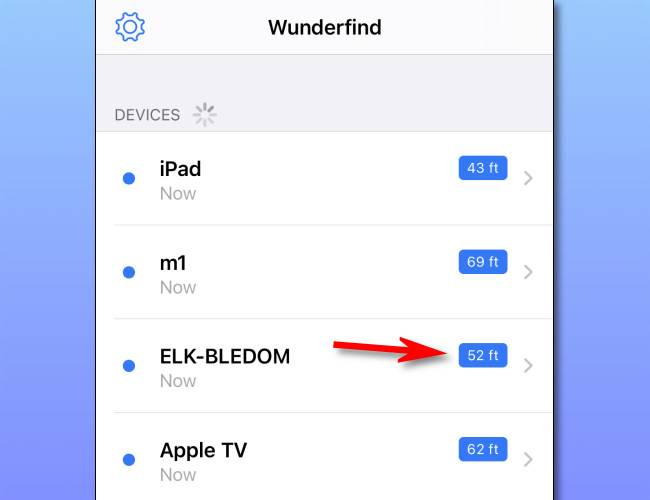
After installing it, launch the app. You might be prompted to allow Bluetooth permissions, which the app needs to work. Next, you’ll see a list of Bluetooth devices that your smartphone has detected using its built-in Bluetooth radio.
Beside each device, you’ll notice an estimated distance between your smartphone’s current location and the hidden or missing Bluetooth device. This number changes dynamically as you move around. To get more detail about signal strength, tap one of the items on the list.
After tapping an item, you’ll see a screen that instructs you to move around while holding your smartphone and watching the signal strength of the targeted Bluetooth device change.
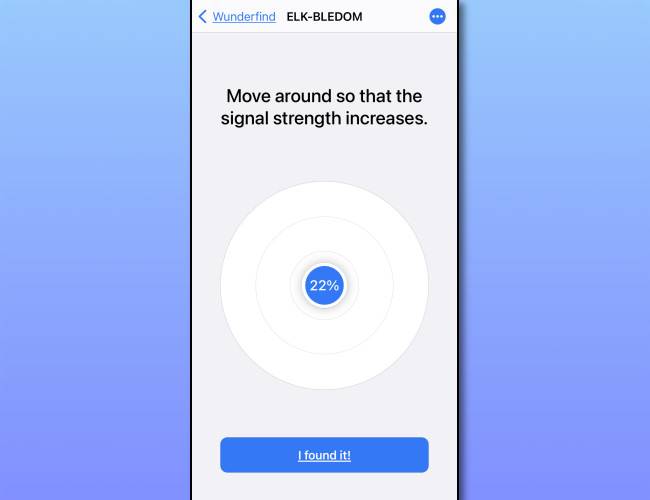
As you get closer to the target device, the signal strength will rise closer to 100%. (On UFind, you’ll inch closer to zero feet). As you move away from the target device, the signal strength will drop closer to 0%. Using this readout, you can move around your space until the signal strength can’t get any higher. If the device is lost and is located is in your home or office, it will be nearby.
[IMAGE: Screenshot of Apple’s Find My app showing device locations on a map]
Find It Using Native Tools
You do not always need a third-party application to track down a lost item. Both Apple and Google built robust tracking networks directly into their operating systems. If you have lost an Apple AirTag, AirPods, or a Samsung Galaxy SmartTag, open the Find My application on your iPhone or the Find My Device application on your Android phone. These tools will show you the device location on a map and play a sound to help you pinpoint it.
For devices that are not in a dedicated tracker network, you can still use your voice assistant. On iPhone, say “Hey Siri, find my [device name].” On Android, say “Hey Google, find my [device name].” Both assistants will trigger the device to ring at maximum volume for 15 seconds, which is highly useful when it is buried under a couch cushion.
[IMAGE: Screenshot of a typical hidden Wi-Fi camera]
If you are searching for a hidden surveillance camera because you suspect you are being spied on, be aware of a critical limitation: most hidden cameras use Wi-Fi to transmit video, not Bluetooth. Bluetooth typically has a short range of 30 feet, meaning someone would have to be nearby to receive the data. These applications cannot detect Wi-Fi-only cameras. If you suspect a hidden Wi-Fi camera, you will need to use other specialized methods to find it.
In the past, we’ve seen a mystery Bluetooth device called “ELK-BLEDOM” in our Bluetooth lists and discovered it was a neighbor’s LED Strip Light, so don’t assume you’re being spied on if you can’t find the unknown device in your home or office—you are very likely picking up a neighbor’s Bluetooth device that is sending stray signals in your direction. Good luck, and stay safe out there!